Saturday, October 10, 2015

Differentiation Workshop to Local Ethiopian Teachers

I am very fortunate that my international school has such a strong and positive relationship with our local community. Last weekend I had the fortune to participate in professional development workshops, teachers at my school were giving to teachers of our local partner school, Mekdela.

The differences between the schools are obvious (and unfortunate). One is a wealthy international school serving sons and daughters of expatriate business people, diplomats, and the likes, while the other is a public Ethiopian “government” school serving over 1600 students on two rotations due to lack of space (a morning and an afternoon shift). From teacher salaries to classroom resources, the similarities are few and far in between. This being said, as expatriates living and working in the developing world, it is (what I see as) our moral obligation to share our knowledge and skills with our local teacher counterparts in whatever ways we can think of, and so these teacher workshops were a wonderful addition to my weekend.

The professional development day included over 80 teacher participants from the Mekdela school. There were about 15 workshops offered by my school’s teachers and teaching assistants. Each workshop was designed to last two hours. Expatriates who did not speak Amharic were provided with one of our school’s TAs, who served as a mediator and translator to the participants. We were to have two such workshops throughout the day.

I chose to share my knowledge of differentiation theory and practice. Immediately after volunteering to share my knowledge at the event, I was struck with the simple and obvious question- How do you differentiate instruction when you are a traveling (“a-la-carte”) teacher who have little to no resources and 40-60 students in a classroom??? I started by taking a deep breath!

After a short visit to classrooms at the local school, several hours of presentation planning, and middle of the night consultation with colleagues, I realized whatever shape the presentation would take, it would have to be interactive (to keep the audience engaged, to build on their knowledge, skills, interests, and needs), and to include both theory AND practice sections (background is important, and so does the application aspect!) And so by the morning, my presentation was born and the classroom prepared with visual aids and concrete resources for the teachers to browse through.
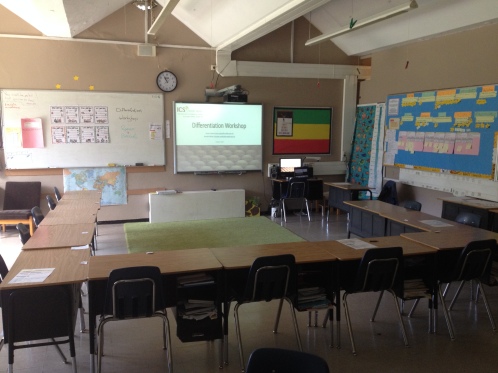


Although I was concerned with the time element, I felt that all the background information and theory, as well as the interactive nature of the presentation, were necessary. And I must say that the workshops went quite well, aside for the fact that I did not take into consideration the delay in participants’ arrival and the time it would take to translate everything I was saying… What I assumed would be two full hours, were actually about 70 minutes of material…

Unfortunately, in the first presentation teachers had little time to work on concrete and authentic strategies for their own classes, which was quite disappointing to me. So I was happy that I had the time to create a packet of handouts for each participant, which included both theory and practical advice for a variety of subjects. Those, I was hoping, would allow them to reflect and experiment in their own time. Not ideal… I had to re-think the second session!


The second workshop went better. I briefly introduced slides, and let Ato Bereket, my fantastic and overly-qualified translator, to take it from there and explain concepts and ideas directly in Amharic. This allowed us to go through the material faster without compromising the discussion and content. We had more time to work on individual strategies, although another hour or two of collaborative work would have been wonderful!


All in all, this was a very successful educational day for everyone involved. After the presentations ended we got together, shared a buna (coffee) ceremony, exchanged thank yous, took a photo together, and started our weekend…
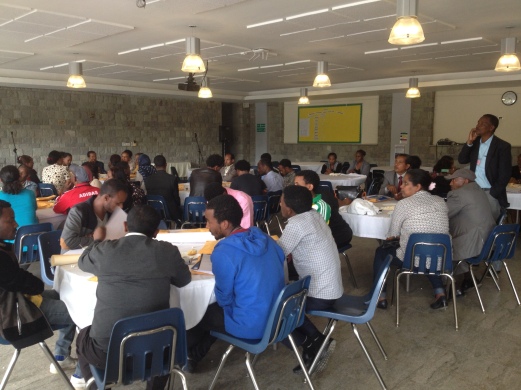


Upon reflection, I must say I am very impressed with the motivation these local teachers have to improve and enrich their understanding and practice as teachers. These workshops were not mandatory, they did not get paid for attending them, and many would think that they would not be very applicable to their situation. Yet they attended, participated, stayed to ask questions, and asked if they could come in the future and observe the classroom or create some sort of a collaborative practice with us teachers.

What an inspirational day. I hope I will continue to be involved in this collaboration and be able to see how these teachers grow in their profession, and how I grow as a result of these experiences.

Tuesday, February 17, 2015

Can Games Change the World?

“Reality is broken and we need to make it work more like a game.” – Jane McGonigal, Game Designer
Jane McGonigal’s brilliant TED talk is mind blowing when one considers the immense challenges our civilization is facing. The possibilities of utilizing everyone, not just scientists and politicians, to buckle up and join the challenge of solving real world problems should not be looked down upon. If millions of people are putting so much time and energy into playing games, then utilized properly, gamers’ curiosity, persistence, perseverance, and creativity could all contribute to solving tangible and authentic problems.
McGonigal discusses the point of an “epic win” where gamers accomplish something they never thought they could, and have an amazing sense of accomplishment. According to her research, games make us feel good, motivated, inspired to collaborate and cooperate, feel like this is the best version of ourselves, and help us find the motivation and courage to get up and confront obstacles. So no wonder so many people spend so many hours playing games all over the world! But unfortunately, this exciting and optimistic feeling is what education for change is lacking…
wow-world-of-warcraft.si
Although I have no knowledge or experience with the game World of Warcraft (“WoW”), I think that what the game has accomplished is astonishing. In 2010, WoW had over 12,000,000 subscribers around the world, which, if their total game time was added up, have played about 5.93 million years… That’s incredible!
So what can we learn from these types of games that would allow us to direct all the time and effort to win toward a more realistic, and needed goal? In WoW, players establish trust, work at their level (Zone of proximal development), feel there is something important to be done, have many willing collaborators to achieve their target, and receive constant encouragement (“+1ing” others). These are some of the conditions that can push education forward!
According to McGonigal, there are four “things” that gamers are practicing and getting better at:
  • Urgent Optimism (epic win is possible),
  • Social Fabric (befriending and collaborating with anyone; trust; values; persistence; bonds, trust, cooperation),
  • Blissful Productivity (willingness to work hard no matter what)
  • Epic Meaning (awe-inspiring missions- create new knowledge)
McGonigal used the fact that school-aged students spend about the same time at school as they play games to expose viewers to the idea of “parallel track of education” (at 6:50). She cites cognitive scientist research (“10,000 hours of success”) that assumes if anyone spends 10,000 hours at something, they would master it. I believe that if we want to make education more motivating and meaningful to students, we must learn from the gaming world.
There is a lot to say and discuss about the need to transform education, so I will leave this topic for now and get back to it later on. But before I end this post, I would like to include this thought-provoking talk by a current (and fantastic) professor of mine, Dr. Chris Haskell:
Afterthought: I would love to explore the games Jane helped create with the Institute for the Future (“World without Oil“and “Evoke“), and perhaps even start a student group who would be playing the game as a part of their extra curricular activities. It is also interesting to read the data compiled about their game “SuperStruct“.
www.UrgentEvoke.com
http://www.UrgentEvoke.com
Wow!

Friday, March 21, 2014

Student Safety on the Internet: A Guide

The Internet can be an amazing resource for everyone to explore and learn, to communicate with others far away, to buy things and pay our bills, and much more! But, it also contains dangers and annoyances, which we should do our best to avoid.
As the Internet continues to develop and change, so do these problems. We cannot, and never will be immunized to all problems all the time, so it is our responsibility, and to our advantage to learn about what these problems might be, and how to effectively use the Internet, so our “surfing” experience is free of dangerous waves…
Roblyer & Doering (2012) outline potential problems related to the use of Internet. Here are a few of them. For your convenience, I also added some solutions and tips for dealing with each potential problem.
Potential Problem #1: Accessing websites with inappropriate materials.
These days, anyone is allowed to publish on the Internet, which is great in many ways, but can also present problems. There are many images, videos, and writings that we, adults, would prefer our children and students are not exposed to. May it be nudity or pornography, hate sites or inappropriate content, it is quite hard to avoid without making an effort. Even the best filter or firewall will not protect us 100% of the time. The higher the filtering level is, the less content is available. This means that the filter will exclude at least some appropriate, and potentially insightful material. An example would be blocking access to www.youtube.com, where not all clips are inappropriate.
Potential Problem #1: Solutions and Tips
• Install Firewalls and Web Filters. Such software protects our computers by preventing access to certain sites as well as by preventing others to gain unauthorized access to our computer.
Visit http://www.pcmag.com/article2/0,2817,2369749,00.asp to find out which are the best 2013 security suites chosen by PCMAG.COM
http://www.cyberpatrol.com/ and http://www.netnanny.com/ are two parental control software that help parents gain the power to adjust the level of filtering they wish to have on their home computers.
• You can adjust the filtering level of search engines. Here is an example of how to adjust filtering level in Google: http://support.google.com/websearch/bin/answer.py?hl=en&answer=510
• Another way to prevent your student from accidentally accessing inappropriate websites while using search engines would be to use childproof search engines. I compiled several of these search engines, and have been using them with my students. You can find them on: http://www.only2clicks.com/pages/stonehillp8/444955
Potential Problem #2: Safety and Privacy Issues for Students
A lot of websites, and especially social networking sites, allow users to create personal profiles and upload their content for everyone to see. According to Carr (2011), nearly half of all 12 year olds in the United States have an account for at least one social networking site despite not meeting the age requirement of 13. They can be impacted negatively from the Internet in different ways, such as:
• Online Predators- In much the same way that under-aged children can gain access to a social networking site, adults can do so as well. Many chat rooms and online discussions can expose children to people on the other side who pretend to be someone else (i.e., a 50 year old Jack pretends to be 12 year old Jill).
• Sales Pitches Aimed at Children- Just like on TV, the internet is also full of advertisements. These days targeted advertising are a big money maker and the use of words, colors, images, etc. can be very tempting to young people, who might be tempted to make commitments they are not ready to fulfill.
• Privacy Issues- It is important to ensure that children do not post unnecessary details about themselves (full names, phone numbers, address, e-mail IDs, etc.). In addition, websites now install “cookies” on the server, which send back to them information about our browsing history, to better match advertising. It is important to know that some of the information these cookies track may violate privacy agreements.
• Cyberbullying- The use of technology to intimidate, harass, threaten, or target people is similar to schoolyard bullying.
Potential Problem #2: Solutions and Tips
• Explain the problem of safety and privacy to your student. Tell him/her to never provide his/her full name, address, phone numbers, etc. to any stranger they meet on the Internet.
• Nourish a relationship of openness and understanding with your student, and engage in discussions about such topics and the dangers involved.
• Discuss online advertising with your student. Explain to them the dangers involved in committing to purchase items without the means to do so, as well as the dangers of using credit cards on the web.
• Perform regular maintenance on your computer. Delete “browser history” and “cookies” every once in a while, or set your browser to automatically delete “cookies” as soon as you close your browser.
• Explain to your student what cyberbullying is, and remind them to let you know if and when they witness or hear about bullying on the Internet. Here are several informational websites to keep you and your students informed about the problem and how to deal with it if it occurs: http://www.stopcyberbullying.org/ and http://cyberbullying.us/.
Potential Problem #3: Computer Viruses and Hacking
Viruses are programs written for malicious purposes (“Malware”). Their purpose is to sabotage computers, to steal information stored on computers, to use computers to do harm to other computers, to display advertisements without permission (“adware”), etc. Two ways to get such viruses is through e-mail attachments and downloads.
o Oftentimes, viruses can be “attached” to files. When the receiver opens the file, the virus is activated and can harm computers. It can then send itself to other people on the user’s address book.
o Viruses can also attach themselves to programs. When users download files or programs (especially illegally), the virus is attached to files and is received along with the files downloaded.
The same problems can happen when a hacker gets into a computer system for the purpose of stealing or corrupting data.
Potential Problem #3: Solutions and Tips
• Never open an attachment from an unknown source.
• “In doubt, DON’T!”- When you are not sure if an e-mail attachment is safe, don’t open it!
• Make sure you have an anti-virus installed on your computer. Keep it up-to-date and run it on a regular basis.
• Make use of a “Firewall”, but remember that some settings can often prevent users from accessing safe and useful websites.
• Download files only from a reputable source.
• There are programs you can install that can help you identify which sites are safe to visit and which aren’t. WOT (Web of Trust) is one of them (http://www.mywot.com/)
Potential Problem #4: Copyright and Plagiarism Issues
There are many resources available on the Internet, and many of them are protected by different international laws. Using such information without the author’s consent can have legal ramifications. Also, the growing number of written resources for students’ use creates the problem of students using the information in their work without crediting the “real” hard-working authors.
Potential Problem#4: Solutions and Tips
• Remind your students that downloading music, movies, and programs off the Internet can be in violation of copyright laws. You wouldn’t like your students to get fined like the woman in this article did: http://www.guardian.co.uk/technology/2012/sep/11/minnesota-woman-songs-illegally-downloaded
• Remind your students to always give credit to the original author/s of published work.
• If a certain site is copyrighted, request permission from its owners.

Source:
Roblyer, M.D. and Doering, A.H. (2012). Integrating Educational Technology into Teaching (6th Ed.). Pearson.

Friday, February 14, 2014

Using Instructional Software in the Classroom

The widespread availability of instructional software has opened up the world of classroom teachers to many new and exciting ways to substitute and supplement to their teaching practices. However, instructional software should be selected and used carefully in order to maximize learning.
The main benefits of different instructional software include keeping students interested and motivated, allowing for differentiated and self-paced work, and exposing students to what otherwise would be impossible due to lack of resources and/or time.
However, there are also potential dangers to using such software. For example, they must be used very carefully or precious instructional time would be lost. There is also a Constructivist-type criticism, which rejects the lack of authenticity and natural integration of such software.
My own experience as a 5th grade homeroom teacher has taught me that instructional software can be a fantastic tool to enrich students’ learning experiences. However, I have also had experiences in which using such software did not only assist students, but even hurt and confused them, to a point of frustration and reduction in motivation. 
In order to illustrate these points, I will discuss three of the instructional software  I use in my classroom- one very successfully, the second with increasing success, and the last with little success and growing frustration…
BrainPop– BrainPop is an excellent tool for learning about different topics through fun and easy-to-understand videos. In addition, it offers quizzes, additional readings, and an activity for each topic viewed. It has a simple and attractive user interface, and maneuvering around the site is very simple and user friendly. Students really enjoy the videos, and it helps me to both introduce and review concepts across the curriculum (math, science, and language).
Mathletics– Mathletics is an excellent game-based software which allows teachers to assign different tasks for students (as a class or individually). It also keeps track of students’ achievements, and offers certificates for earning certain points. Although I feel that I am using it quite effectively, because students report they enjoy playing the games, and I have seen progress made, it was not always like that. When we first received this software, there was no tutorial to go along with it. I used it to the best of my understanding, which was inadequate! By assigning tasks to students, it blocked them from access to different parts of the websites (for example to the “Online Mathletics” area, that has fun competitive games). I also accidentally (and repeatedly) re-assigned tasks to students, which deleted their previous scores and achievements. In addition to that, the website requires the newest Adobe Flash version, which most of our computers did not allow us to upgrade to, since we did not have administrative privileges. Lastly, living in a developing country, Internet connection is quite slow, and in many cases students could not successfully log in- both at home and at school. As a result, my students were frustrated. They complained repeatedly, and precious instructional time was wasted on waiting and re-doing things. As I continue to learn about the software, I use it more efficiently and get more out of it, and my students continue to improve their skills and have fun learning.
Mahara– At my school we recently began using Mahara, mainly as an ePortfolio software for our students. The problem with Mahara has started even before we received it. Our new ICT department has decided to replace several of the existing software, and very quickly the teachers found themselves learning several new technologies in a short time. There was no clear explanation as to why Mahara was chosen, and the introduction of it to staff was not very organized. Teachers were told that this is the tool they will be using, and so the sooner they learn how to use the software, the better. A few tutorials were created and handouts distributed by the ICT department, and teachers were off to fend for themselves. However, although a few teachers worked diligently to learn the new software, most others did not bother to do so. One thing was shared by all- the complaints. Teachers complained that the system was not user friendly, that they did not have enough time to learn it, that there are fundamental flaws in it (such as the inability to export portfolios), etc. etc. And that’s even before students were introduced to the software. 
 
These three scenarios hopefully illustrated the relative advantage of different instructional software at my school. In the following Powerpoint Presentation, I explain what instructional technology is, give examples of five different types of instructional software, explain how to properly select and utilize them, and present different benefits and potential limitations for each. I conclude with some useful links for educators, most of which could help teachers select appropriate (and tested) instructional software for their needs.

Sunday, April 28, 2013

Access to the Curriculum: The Use of Assistive Technologies

I remember being in Elementary school, complaining my hand was tired of writing so much, and my teacher talking too much about the issue she discussed until some of us almost fell asleep. I also remember that two of my peers had learning difficulties. One was mostly deaf and the other had a physical deformity, which caused her severe fine and gross motor problems. Both of them had little opportunities to gain access to the curriculum, let alone “equal”. That was in the mid 1980s. We are now approaching the “mid 2010s”, and the picture has dramatically changed. Computer-based technology has allowed people with disabilities to gain access to information, to manipulate objects and information, and to express themselves in ways other people can understand, relate to, and appreciate. Such technology is called “Assistive Technology”.
Assistive Technologies is defined by the American Assistive Technology Act of 1998 as “Any item, piece of equipment, or product system, whether acquired commercially off the shelf, modified, or customized, that is used to increase, maintain, or improve functional capabilities of individuals with disabilities.” (Pinantoan, 2012).
There are many types and degrees of “disabilities”, and designers and creators of Assistive Technology have been creating more and more tools as solutions for the variety of ways individuals struggle. The PBS Parents website divides these devices into 8 categories: access and environmental control, aids to daily living, assistive listening, augmentative/alternative Communication, computer-Based Instruction, mobility, positioning, and visual aids (“Assistive technology devices,” 2013).
A variety of computer companies, such as Microsoft and Apple, have recognized the need to develop such tools, and have pledged a commitment to ensure accessibility for their users. The Accessibility sections of their websites are easily accessible, organized, and simple to navigate (“Apple’s commitment to,” 2013; and “Guides by impairment,” 2013). In addition, they ensure that many of the accessibility functions come built-in and easily accessible, so users are able to make use of such features without needing to go out and purchase additional software.
In order to get a better idea of what my computer is offering as part of its built-in Assistive technology features, I played around using the excellent “Spotlight” feature on my Mac, found different features, tried them out, and went on the Apple Education website to find out more about what these features include which I did not discover. The link to the document below outlines the different features I found and tested.
————————————————-
References:
Apple in education. (2013). Retrieved from http://www.apple.com/education/special-education/
Apple’s commitment to accessibility. (2013). Retrieved from http://www.apple.com/accessibility/
Guides by impairment. (2013). Retrieved from http://www.microsoft.com/enable/guides/default.aspx
Pinantoan, A. (2012). Learning difficulties: What can technology do for disabled learners?. Retrieved from http://www.opencolleges.edu.au/informed/features/what-can-technology-do-for-disabled-learners/